🛠️ Beginner Guide: How to Install Mods in Captain of Industry 🚢
Hello Captains! 👋
This guide explains how to install mods for Captain of Industry after downloading them from COI Hub or another mod page.
It is written for complete beginners, so every step is explained clearly and slowly. 👍
🌟 Quick Summary
✅ Basic Installation Flow
- 📦 Download the mod
- 🧰 Extract the
.zipfile - 📁 Put the mod folder inside the Captain of Industry
Modsfolder - 🎮 Start the game
- ⚙️ Enable the mod
- ✅ Enjoy modded gameplay
🪟 Windows Installation
📦 1. Download the Mod
Download the mod from the mod page.
Most mods come as a:
📦 .zip file
⚠️ Important:
Do NOT put the .zip file directly into the Mods folder.
You usually must extract it first.
📁 2. Open the Mods Folder
Press:
⌨️ Windows Key + R
Paste this:
📁 %APPDATA%\Captain of Industry\Mods
Press:
⏎ Enter
📂 If the Folder Does Not Exist
Create a new folder named:
📁 Mods
The full path usually looks like this:
📁 C:\Users\YourName\AppData\Roaming\Captain of Industry\Mods
⚠️ Important Warning
This is NOT the Steam game installation folder.
❌ Wrong location:
📁 Steam\steamapps\common\Captain of Industry
✅ Correct location:
📁 %APPDATA%\Captain of Industry\Mods
Captain of Industry loads mods from the AppData folder.
🧰 3. Extract the Mod
Right-click the downloaded .zip file.
Choose:
📦 Extract All...
Extract it into:
📁 %APPDATA%\Captain of Industry\Mods
✅ Correct Folder Structure
After extracting, the folder should look like this:
✅ Correct:
📁 Mods\ExampleMod\ExampleMod.dll
This means the .dll file is directly inside the mod folder.
❌ Wrong Folder Structures
❌ Wrong:
📁 Mods\ExampleMod.zip
➡️ The zip file is not extracted.
❌ Wrong:
📁 Mods\ExampleMod\ExampleMod-v1.2\ExampleMod.dll
➡️ Too many folders deep.
✅ Fix
Move the real mod folder so it becomes:
✅ Mods\ExampleMod\ExampleMod.dll
🐧 Linux / Steam Deck Installation
⚠️ Captain of Industry currently has no official native Linux version.
Most Linux and Steam Deck players use:
🧪 Steam Proton
Because of that, the mod folder is inside Proton’s Windows folder.
📁 Common Linux Path
📁 ~/.steam/steam/steamapps/compatdata/1594320/pfx/drive_c/users/steamuser/AppData/Roaming/Captain of Industry/Mods
🎮 Common Steam Deck Path
📁 /home/deck/.local/share/Steam/steamapps/compatdata/1594320/pfx/drive_c/users/steamuser/AppData/Roaming/Captain of Industry/Mods
📦 Flatpak Steam Path
📁 ~/.var/app/com.valvesoftware.Steam/.local/share/Steam/steamapps/compatdata/1594320/pfx/drive_c/users/steamuser/AppData/Roaming/Captain of Industry/Mods
🧰 Linux Install Steps
- 📦 Download the mod
- 🧰 Extract the
.zipfile - 📁 Find the Proton folder
- 📂 Open or create the
Modsfolder - 📁 Put the extracted mod folder inside
Mods - 🎮 Start the game
- ⚙️ Enable mod support if needed
- 🔄 Restart the game
- ✅ Activate the mod
🍎 macOS Installation
⚠️ Captain of Industry currently has no official native macOS version.
Mac users usually play through:
🍷 CrossOver
🥃 Whisky
🛠️ Game Porting Toolkit (GPTK)
☁️ Cloud streaming services
If you use cloud streaming, you usually cannot install local mods manually.
🍷 CrossOver Example Path
📁 ~/Library/Application Support/CrossOver/Bottles/YOUR_BOTTLE_NAME/drive_c/users/crossover/AppData/Roaming/Captain of Industry/Mods
Replace:
YOUR_BOTTLE_NAME
with your actual bottle name.
🍎 Mac Install Steps
- 📦 Download the mod
- 🧰 Extract the
.zipfile - 🍷 Open your bottle/prefix
- 📁 Find the
drive_cfolder - 📁 Open the AppData path
- 📂 Create or open the
Modsfolder - 📁 Put the mod folder inside
- 🎮 Start the game
- ⚙️ Enable mod support if needed
- 🔄 Restart the game
- ✅ Activate the mod
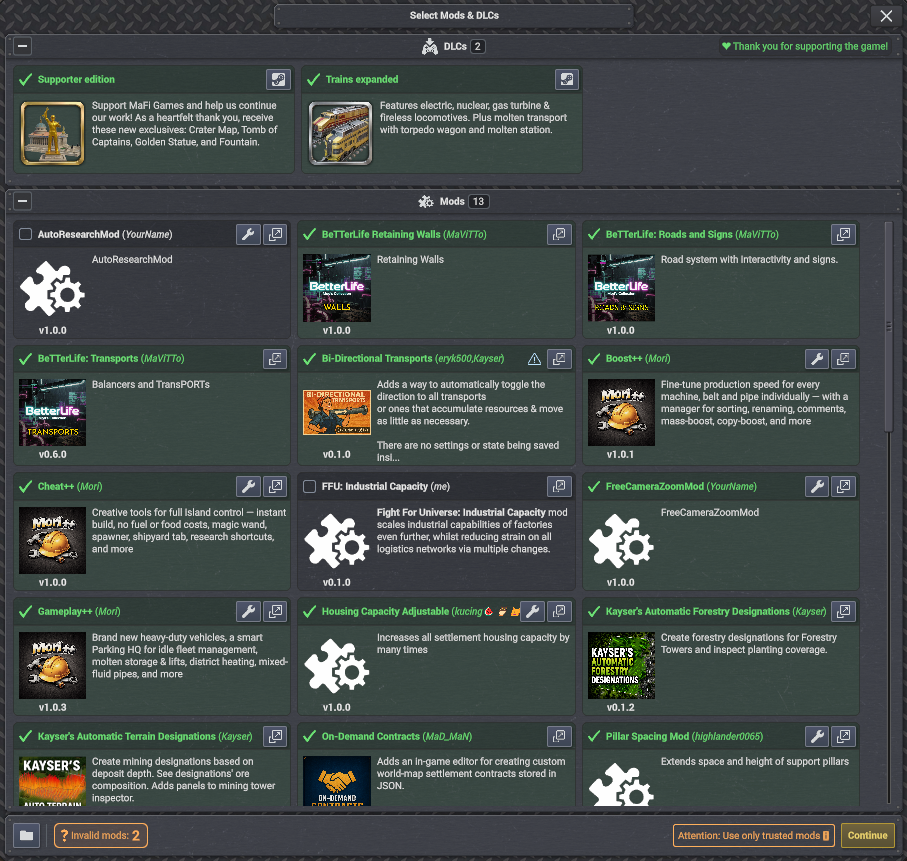
🎮 4. Activate the Mod
After opening the game, 🎮 start a new game or 💾 open the save/load screen.
If you see a mod list, enable the mod you want to use. ✅
Example:
💡 Helpful Tip:
For large gameplay-changing mods:
🆕 Starting a new save is usually safer
unless the mod author says existing saves are supported.
✅ Quick Checklist
Before asking for help, check this list:
✅ The mod is extracted
✅ The mod is not still zipped
✅ The mod is inside the correct Mods folder
✅ The mod folder contains a .dll file
✅ The .dll is not buried too deep
✅ Mod support is enabled in-game
✅ You restarted the game after enabling mods
✅ The mod supports your current game version
🧯 Troubleshooting
❓ The Mod Does Not Appear
First, check your folder structure.
The game usually expects:
📁 Mods\ModName\ModName.dll
Also make sure:
🔄 You restarted the game after enabling mods.
🔍 Very Important Extra Tip
Sometimes the mod actually loaded correctly, but the changes are difficult to notice at first. 👀
Many mods add things like:
🆕 New buttons
📚 New research
⚙️ Hidden settings
🏭 New buildings
📋 Extra menus
🔧 Small UI buttons
🧩 Features inside existing systems
Some modders show beautiful screenshots of what the mod does, but do not always explain:
❓ Where to find the new feature
❓ How to activate it
❓ Which menu changed
This can make it look like the mod failed to load, even when it is working perfectly.
💡 What You Should Do? 🤔
Before assuming the mod is broken:
✅ Carefully read the mod description
✅ Look at screenshots closely
✅ Search for new UI buttons or research
✅ Check build menus and research trees
✅ Read comments/discussions if available
Sometimes the mod feature is simply “hidden” somewhere unexpected. 🔎
This tip alone can save a LOT of confusion for new players — and save modders a lot of support time too. ❤️
If you are unclear about something, don't afraid to ask the modders directly! They are very nice people~
🔍 I Cannot Find AppData (Windows)
Try press:
⌨️ Windows Key + R
Paste:
📁 %APPDATA%
Press:
⏎ Enter
Then open:
📁 Captain of Industry\Mods
🐧 I Cannot Find the Folder on Linux / Steam Deck
Launch the game once first.
Then check the Proton folder for Steam app ID:
🎮 1594320
Common path:
📁 steamapps/compatdata/1594320/pfx/drive_c/users/steamuser/AppData/Roaming/Captain of Industry/Mods
🍎 I Cannot Find the Folder on Mac
If using:
🍷 CrossOver
🥃 Whisky
🛠️ GPTK
Search inside your bottle/prefix for:
📁 Captain of Industry
Then create/open:
📁 Mods
💥 The Game Crashes After Installing a Mod
Try this:
- ❌ Close the game
- 🗑️ Remove the newest mod
- 🎮 Start the game again
- 🔍 Check if the mod supports your game version
📜 Log Files
You can check logs here:
📁 %APPDATA%\Captain of Industry\Logs
On Linux or Mac, the Logs folder is inside the same user data folder.
🆘 Still Having Problems?
If the game still crashes:
💬 Ask the modder
💬 Visit Discord/forum
💬 Share your logs/screenshots
Most modders are happy to help if you provide useful information. ❤️
🧠 Extra Tips for New Players
💾 Make backup saves before using mods
🧪 Test one mod first before installing many
📖 Read the mod page carefully
🔄 Restart the game after changing mods
🧹 Remove old versions before updating mods
🧩 Some mods require dependency mods
⚠️ Game updates can break mods
🔗 Useful Links
🌐 COI Website: https://www.coigame.com
🏭 COI Hub: https://hub.coigame.com
📚 Wiki: https://wiki.captain-of-industry.com/
💬 Discord: https://discord.com/invite/JxmUbGsNRU
🛠️ Official Modding GitHub: https://github.com/MaFi-Games/Captain-of-industry-modding
🏭 Final Words
That’s it! 🎉
You have now successfully installed a mod for Captain of Industry. 🚢⚙️🏗️
Happy building, happy modding, and may your factory always run smoothly! 💙