
Kayser's Automatic Terrain Designations v0.3.1
Designate entire deposits with a single click. See deposits’ composition. Clear debris. Make corner designations.
| Source code | https://github.com/Kayser1444/CoI_AutoTerrainDesignations |
| Websites |
⛏️ Automatic Terrain Designations
One Mine, One Click — Once You Plop, You Can’t Stop.
📋 Overview
Kayser’s Automatic Terrain Designations is a Quality of Life mod for Captain of Industry that generates tailored mining designations for your mine towers. Instead of manually creating designations across complex ore deposits, this mod analyzes terrain depth and automatically creates designations that follow the contours of your ore bodies, bypassing the chore of placing and continually maintaining manual designations.
Related add-on features include access ramps, debris clearing, and manual corner designations.
Mine away!
⚙️ Features
- Create Designations — Instantly designate all mineable ore within a mine tower's area
- Generate Ramps — Generate access ramps to connect new dig areas to the surface
- Clear Designations — Easily cleanup all designations within a tower's area
- See Ore Composition of the designation
- Set Mining Priority on tower level
- Clear Debris in the tower area
- Settings to fine tune the designations
- Corner Designations for manual placement
⚡ Quick Start Guide
- Select a mine tower
- Ensure the tower area covers a body of some resource
- Click ’Create Designations’ to generate designations
- Adjust settings, clear designation, and recreate until happy
- Watch your mining crews dig out the entire deposit
Happy mining!
PS. Leave a 👍 or a ⭐️ if you found this mod useful.
User Interface
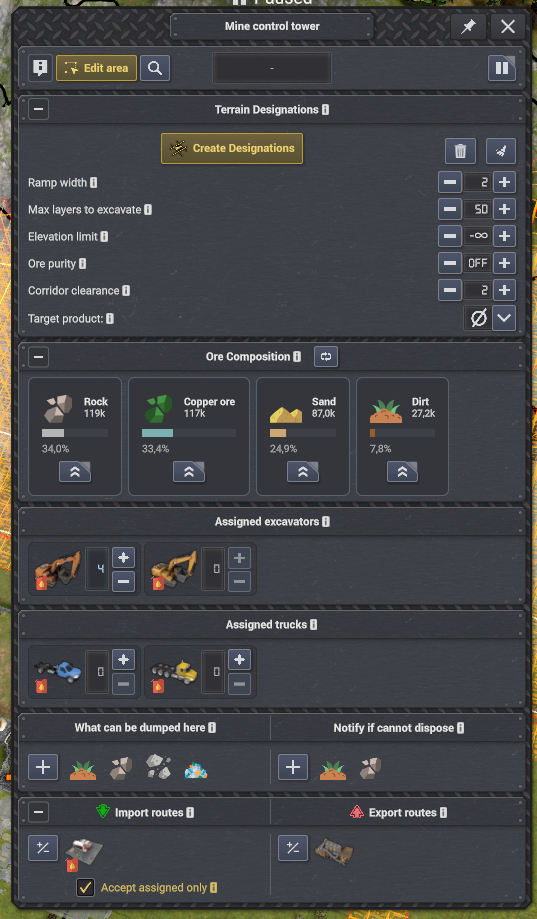
Screenshots
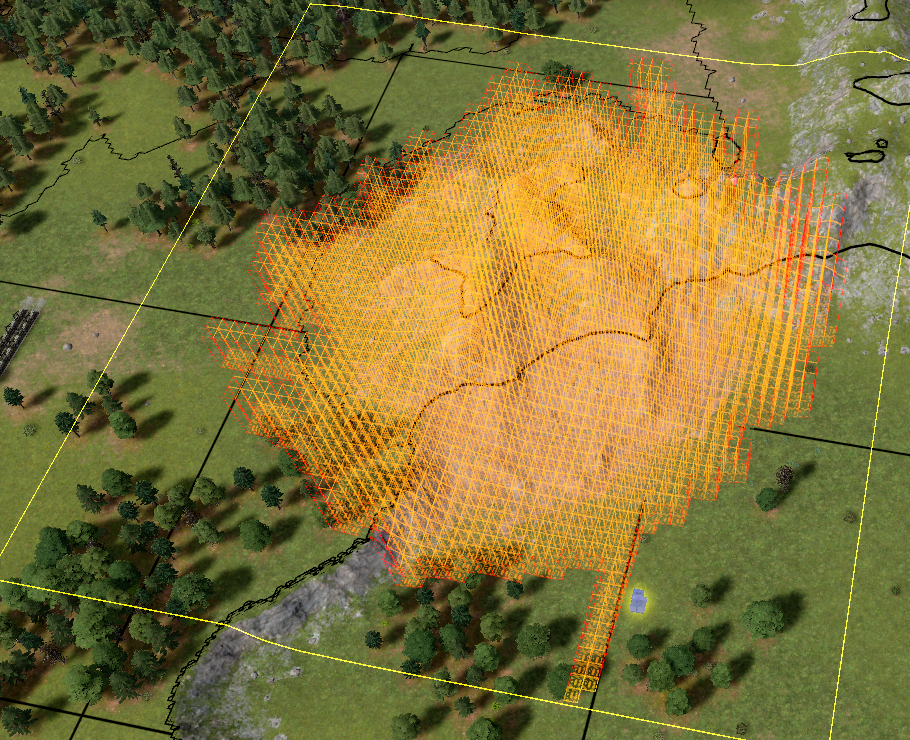
Entire deposits designated through a single click.
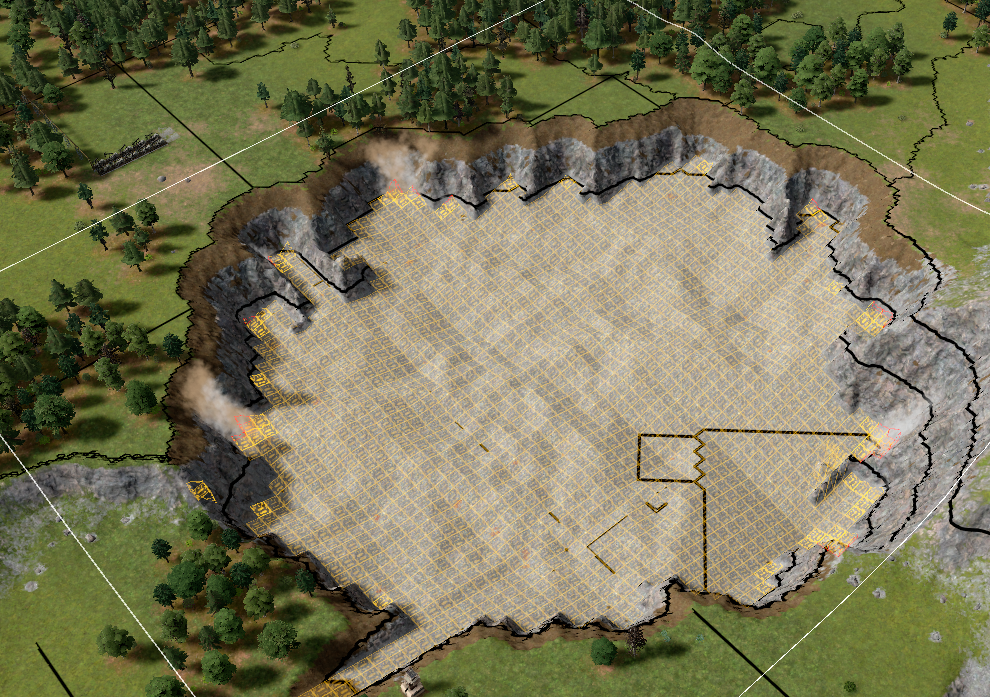
Entire deposit dug out with surgical precision.
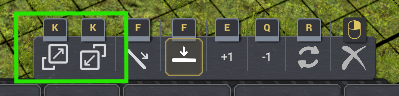
Manual corner designations toolbar.
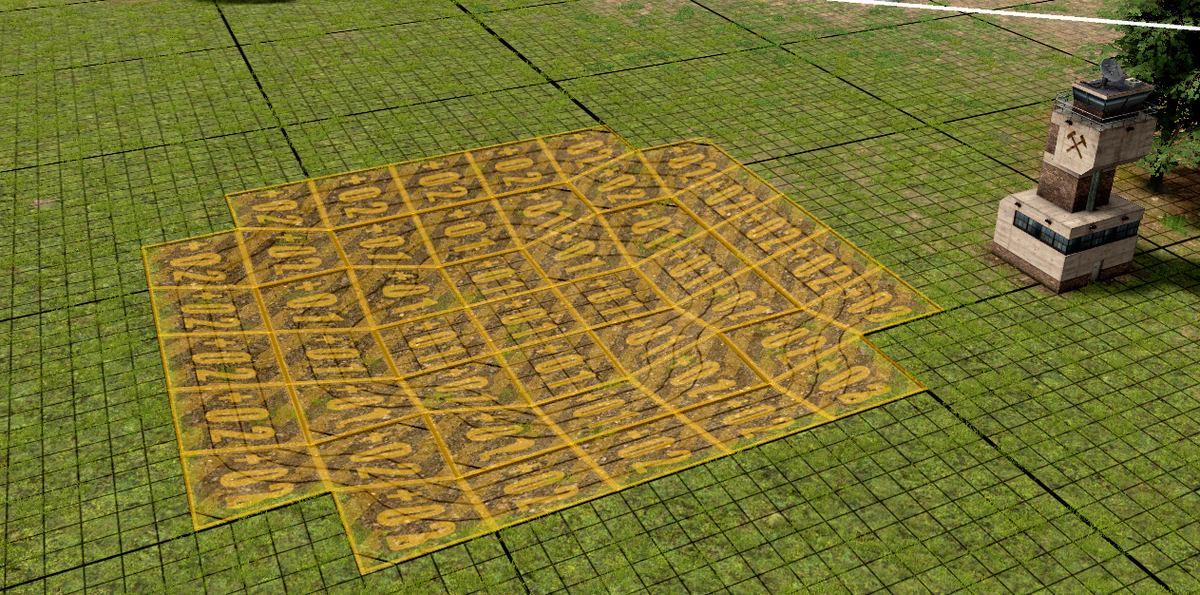
Manual corner designations create smooth, connected surfaces in 3D.
This mod has no dependencies.
No other mods depend on this mod yet.
AutoTerrainDesignations v0.3.0 — Manual Corner Designations
May 08, 2026 v0.3.0AutoTerrainDesignations v0.3.0 — Manual Corner Designations
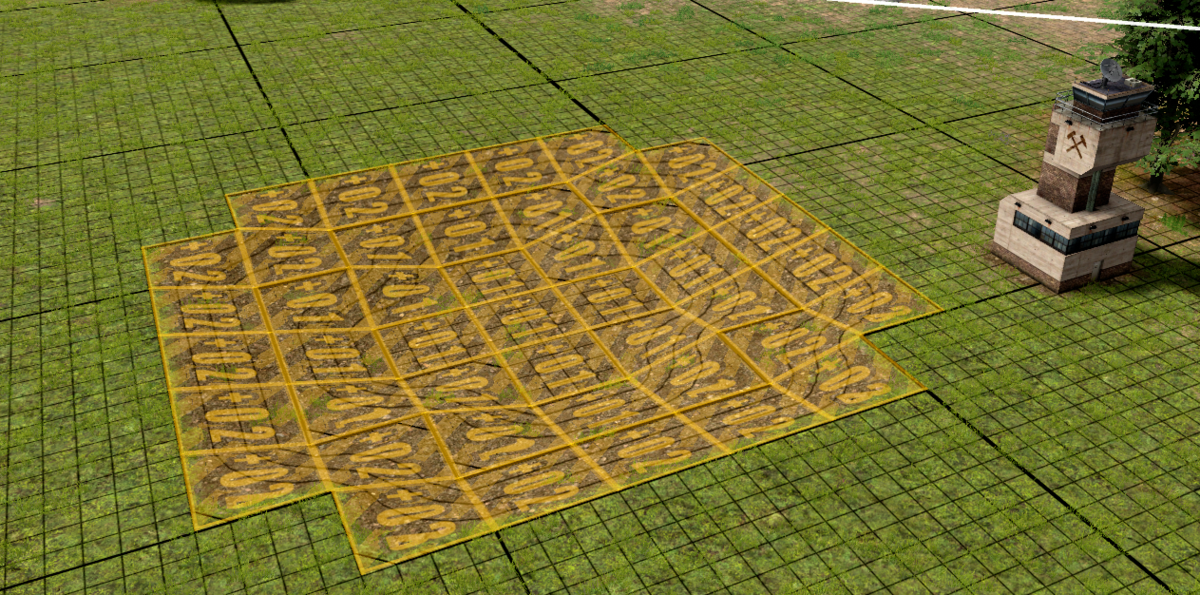
Corner designations — the special diagonal-slope tiles that were previously only available through generated designations — can now be placed manually.
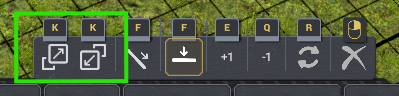
Corner placement mode is available from within any terrain designation tool (Mining M, Dumping Z, Leveling N). Enter it via the new ▲/▽ toolbar buttons or by pressing K when within one of the terrain designations tools.
What you can do
🔲 Choose the corner type. Outer (convex) and inner (concave) corners each have a dedicated toolbar button. Press K to flip between them.
🔄 Rotate the orientation. Press R to rotate the unique corner clockwise (NW → SW → SE → NE), so you can face the slope in any direction.
↕️ Set height with Q/E. The height offset from the active tool carries through into corner mode, so the placed slope lands exactly where you intend.
🧲 Snap to existing designations automatically. When you hover over a tile adjacent to an existing designation, corner mode reads the neighbour's height and variant and matches them — both edge-sharing and diagonal neighbours are considered. Vanilla designations snap to corner designations the same way, so you can seamlessly extend from placed corner designations.
⛏️ Place a diagonal slope in one drag. Hold and drag a rectangle. The area fills with a checkerboard of outer (▲) and inner (▽) corners that interlock into a continuous diagonal slope — no tile-by-tile placement required.
🔧 Works with all three designation tools. The placed corners use whichever tool is active — Mining, Dumping, or Leveling.
New Feature: Remove Debris
May 03, 2026 v0.2.3Auto Terrain Designations v0.2.3
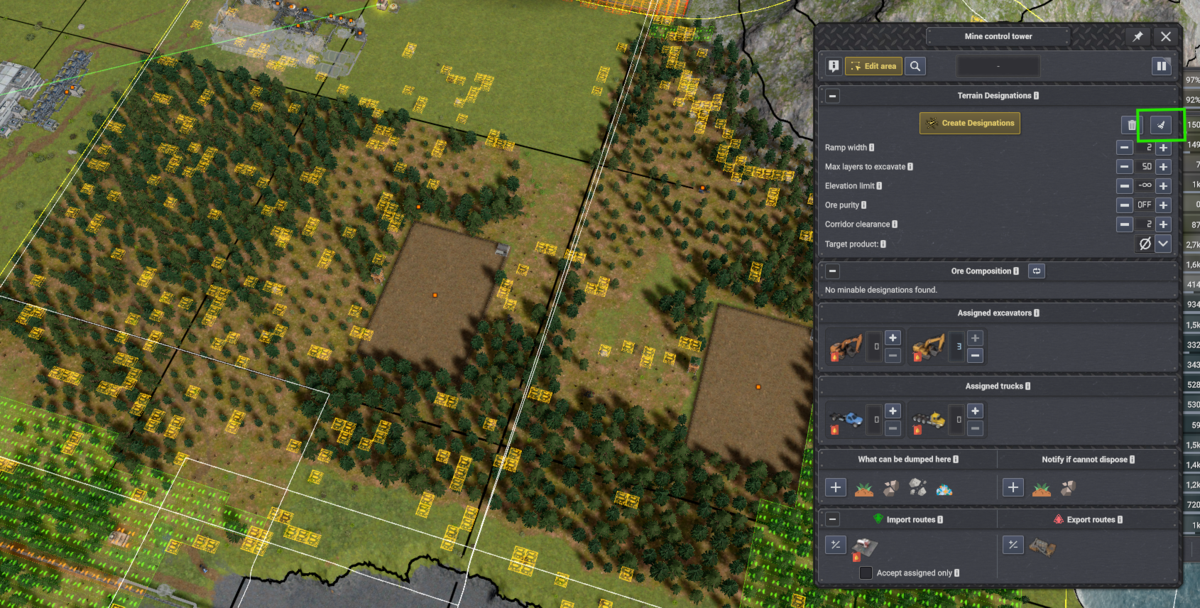
This patch adds experimental Remove Debris support.
You can now designate blocking debris in a mine tower area for mining/removal with a dedicated sweep button. (Auto mode can also fall back to debris removal when no useful product is found, before targeting dirt.)
The debris action avoids digging into the ground and overwriting existing terrain designations, while still allowing debris in forested areas to be marked for removal.
v0.3.1
Latest| Game version | 0.8.2 - 0.8.4b |
| Released | May 09, 2026 |
| File size | 940.7 KB |
| License | MIT |
Changelog
v0.3.1 | 2026-05-09
* Ramp generation warnings now shown as a yellow icon next to the **Create Designations** button (tooltip contains the message):
- "Ramp generation failed — no valid path found."
- "Ramp placed but did not reach the surface — excavators may not be able to excavate."
- "Couldn't find a valid path from the tower to the generated ramp. Check for access problems."
* Increased generated ramp safety margin around nearby buildings by 1 tile. Landslide can still reach buildings if built on deep dirt/sand.
* Added a bottom-flattening pass to reduce rough/bumpy excavation floors; designations floor should now be noticeably flatter. Can be toggled on/off with **atd_set_bottom_flattening on/off**.
* Tuned default **Low** and **Med** ore purity thresholds to reduce the jump from **Off**; existing **ATDsettings.json** values are preserved. Added **atd_reset_to_defaults** to try built-in defaults in memory.
* Renamed the **Target product** label to **Scanning filter** to avoid confusion with mining priority.
v0.3.1 | 2026-05-09
v0.3.1 | 2026-05-09 * Ramp generation warnings now shown as a yellow icon next to the **Create Designations** button (tooltip contains the message): - "Ramp generation failed — no valid path found." - "Ramp placed but did not reach the surface — excavators may not be able to excavate." - "Couldn't find a valid path from the tower to the generated ramp. Check for access problems." * Increased generated ramp safety margin around nearby buildings by 1 tile. Landslide can still reach buildings if built on deep dirt/sand. * Added a bottom-flattening pass to reduce rough/bumpy excavation floors; designations floor should now be noticeably flatter. Can be toggled on/off with **atd_set_bottom_flattening on/off**. * Tuned default **Low** and **Med** ore purity thresholds to reduce the jump from **Off**; existing **ATDsettings.json** values are preserved. Added **atd_reset_to_defaults** to try built-in defaults in memory. * Renamed the **Target product** label to **Scanning filter** to avoid confusion with mining priority.
v0.3.0 | 2026-05-08
v0.3.0 | 2026-05-08
* Corner designations can now be placed manually from within any terrain designation tool (**M**, **Z**, **N**) — use the new **▲**/**▽** toolbar buttons or press **K** (**K** again flips between outer/inner); supports height offset (**Q**/**E**), rotation (**R**), and auto-snap to neighbouring designations; vanilla designations also snap to corner designations
- Corner mode exits automatically when chosing one of the vanilla modes (flat/ramp) or the designation tool is deactivated
* Better quality thumbnail
v0.2.4 | 2026-05-04
v0.2.4 | 2026-05-04
* Settings file renamed from **settings.json** to **ATDsettings.json** to avoid conflicts with other mods
* Existing **settings.json** files are still read as a legacy fallback and migrated into the generated **ATDsettings.json** format
* **ATDsettings.json** is no longer distributed inside the mod ZIP — it is generated automatically in the mod folder on first run, populated with the current defaults and inline documentation
* Settings file now contains a **settingsVersion** stamp; when the mod version advances the file is automatically migrated (user values are preserved and any new keys are added)
* Added **atd_save_settings** console command to write the current in-memory global defaults back to **ATDsettings.json** at any time
* Added global defaults for whether the Terrain Designations and Ore Composition panels start expanded or collapsed, configurable via **ATDsettings.json** or console commands.
* Fixed Corridor clearance modifier-click handling so Shift/Ctrl jumps directly between Off and 2 instead of requiring multiple clicks.
v0.2.3 | 2026-05-03
v0.2.3 | 2026-05-03
* Added experimental Remove Debris scan support, available as a dedicated action and as an auto fallback when no useful product is found.
v0.2.2 | 2026-05-03
v0.2.2 | 2026-05-03
* Added concise license and attribution notices to source files and README.
v0.2.1 | 2026-05-03
v0.2.1 | 2026-05-03
* Added the mod marker/version tooltip to both inspector panels.
* Made the Ore Composition panel explicitly collapsible again while keeping it open by default.
* Added horizontal scrolling to Ore Composition cards so towers with many ore products no longer overflow the inspector column.
* Fixed the Ore Composition panel so it can populate for custom IAreaManagingTower implementations; excavator priority controls remain limited to vanilla mine towers.
* Fixed clearing terrain designations so it only removes mining designations and preserves other designation types such as forestry. Placing mining designations will still overwrite other designations.
v0.2.0 | 2026-05-01
v0.2.0 | 2026-05-01
* Changed project license to MIT and added a repository LICENSE file.
* Added short MIT/SPDX license annotations to source files.
v0.1.15 | 2026-05-01
v0.1.15 | 2026-05-01
* Fixed incorrect trimming of poor ore near the bottom of the designation.
* Changed the label Override product to Target product to make it clearer.
* Added a per-tower Corridor clearance setting for separated ore components and passability.
* Added in-game console commands for live tuning of all ATD global defaults.
* Updated the API with initialization checks, per-tower settings accessors, panel builder methods, and ramp-width driven designation creation.
v0.1.14 | 2026-05-01
v0.1.14 | 2026-05-01
* Improved designation logic to reduce the risk of vehicles getting stuck.
* Connectivity now uses 2-tile-wide designation corridors for mega-vehicle passability.
* Enclosed interior holes inside designation regions are now automatically filled.
* Single-tile pinch points inherited from the ore scan are now widened.
v0.1.13 | 2026-05-01
v0.1.13 | 2026-05-01
* Fixed an issue with settings.json not parsing in some locales.
v0.1.12 | 2026-05-01
v0.1.12 | 2026-05-01
* Tower settings are now persistent throughout a session.
* Excavator priority is now a sticky state per tower and can be reset to None.
* Ore Purity OFF is now more aggressive when sweeping up ore.
* Externalized global default parameters to settings.json.
* Fixed an invalid settings.json path issue.
v0.1.11 | 2026-05-01
v0.1.11 | 2026-05-01
* The Ore Composition panel now refreshes automatically after creating designations.
* Terrain Designations panel is now collapsible.
* Added the Ore Purity Level preset setting and externalized its thresholds to settings.json.
* Ramp generation now tries to avoid all buildings.
v0.1.10 | 2026-05-01
v0.1.10 | 2026-05-01
* Improved ramp generation with selectable ramp width, better z-level targeting, better attachment to designation edges, and tower avoidance.
* Added buttons on ore composition cards to set mining priority for all tower excavators.
* Overhauled the UI with a more prominent Create Designations button and visually tuned ore composition cards.
v0.1.9 | 2026-05-01
v0.1.9 | 2026-05-01
* Fixed broken non-tower inspectors.
* Fixed stale Ore Composition data after switching inspectors.
* Made the Ore Composition panel always visible and replaced auto-refresh with a manual scan button.
* Ore Composition panel now clears when switching to a different tower inspector.
v0.1.8 | 2026-05-01
v0.1.8 | 2026-05-01
* Ore Composition panel now refreshes correctly when switching tower inspectors.
* Ore Composition now counts only material above the designation target level.
* Dumping designations are excluded from the Ore Composition scan.
* Redesigned Ore Composition cards with proportional color-coded progress bars and percentage shares.
v0.1.7 | 2026-05-01
v0.1.7 | 2026-05-01
* Added the Ore Composition panel for the mine tower inspector.
* Ore Composition quantities reflect the current Ore Mining Yield difficulty setting.
* Ore Composition panel refreshes automatically when designations change.
* Fixed a mod package extraction issue on Linux.
v0.1.6 | 2026-05-01
v0.1.6 | 2026-05-01
* Added Max layers to excavate and Max depth settings.
* Clearing designations is now instantaneous regardless of area size.
* Bedrock is now always excluded from terrain scans.
* Added the AutoTerrainDesignationsApi integration API.
v0.1.5 | 2026-05-01
v0.1.5 | 2026-05-01
* Adjusted max slope to 1 to prevent dead spots.
v0.1.4 | 2026-05-01
v0.1.4 | 2026-05-01
* Moved UI controls to their own panel for better compatibility and robustness.
* Updated the placement algorithm to reduce the risk of excavators getting stuck.
v0.1.3 | 2026-05-01
v0.1.3 | 2026-05-01
* Fixed UI collision by changing from text-based buttons to icon-based buttons.
* Added scanning for any mineable product through the product selector.
* Improved scanning, particularly along deposit edges.
* Added thumbnail.
v0.1.0 | 2026-05-01
v0.1.0 | 2026-05-01
* Initial release.