Why do you insert path?
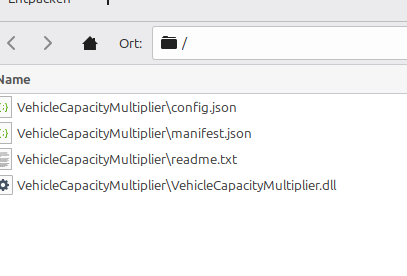
If I extract it, I've got Filenames with this "\".
Why do you insert path?
If I extract it, I've got Filenames with this "\".
Hi SlyPulsar,
I am very sorry for this inconvenience! The issue occurs because the zip file was created on Windows, which uses backslashes (\) for folders, while Linux sees that whole string as just a single filename.
To fix this easily on Linux, please try one of these simple steps:
Option 1: Instead of using the default file manager, try opening the zip with 7-Zip or PeaZip if you have them installed, as they usually handle Windows paths correctly.
Option 2: You can manually create a folder named VehicleCapacityMultiplier. Then, rename those extracted files to remove the VehicleCapacityMultiplier\ prefix and move them into that folder.
Option 3: If you are comfortable with the terminal, simply run unzip filename.zip and it should automatically convert the paths for you.
I will make sure to update the archive format to be more compatible with Linux in the future. Thanks for pointing this out!